A key advantage of Google Drive is the ability to store files in the cloud, not only making files accessible to you and your team from anywhere, but also helping you conserve storage space on your local computer or device. Below, we discuss how to find out your Google Drive storage usage, in addition to how you can upgrade for more storage.
View Your Current Google Drive Storage
- To view your personal storage usage, go to drive.google.com/settings/storage.
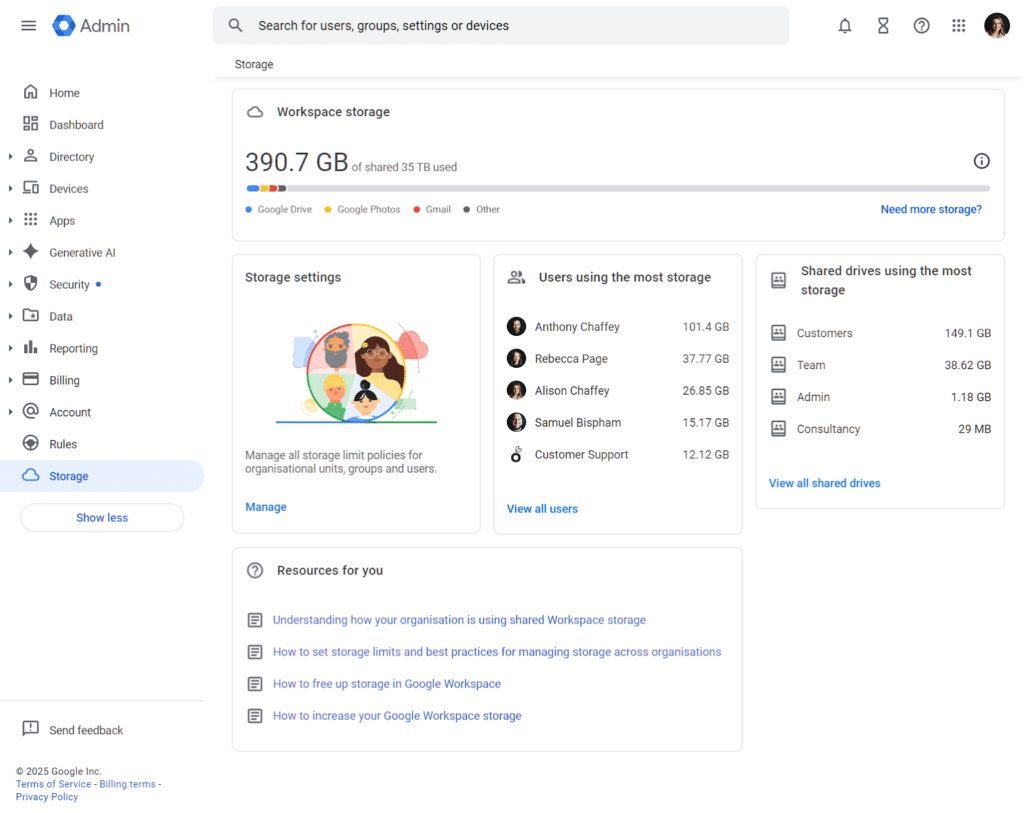
- To view the total storage across the organisation, you must have an ‘Administrator’ role. You can then log in to the Google Admin Console, and navigate to the ‘Storage’ setting on the left-hand sidebar. At the top, you’ll see the organisation’s total storage limit, including how much is used across Gmail, Google Drive and Photos. You’ll also be able to click ‘View all users’ to see a list of a user’s specific storage details.
When To Increase Google Drive Storage
Google Workspace will let you know by email when you are approaching your storage limit, which will be your prompt to explore more storage capacity; however, a good rule of thumb is to look at your upgrade options when you reach the 80-90% full mark.
Google Storage Plans
Your allocated Google Drive storage depends on your Google Workspace plan. See below for storage limitations.
| Business Starter | Business Standard | Business Plus | Enterprise | |
|---|---|---|---|---|
| Drive Secure Cloud storage (per user) | 30GB | 2TB | 5TB (pooled) | 5TB (pooled) |
| Email Storage (per user) | 30GB | 2TB | 5TB | 5TB |
| Flexible Pricing (per user/per month) | £7 | £14 | £22 | Contact us for pricing |
| Annual Pricing (per user/per month, 12 month commitment) | £5.90 | £11.80 | £18.40 | Contact us for pricing |
What is “Pooled” Storage?
Pooled storage is a flexible storage model where the total amount of cloud storage for your organisation is shared among all of your licensed Google Workspace users, rather than being fixed per user. Pooled storage includes data from Google Drive (including shared drives), Gmail and Google Photos.
For example, if you are on a Business Plus Plan, you will have 5TB of storage per user, so for an organisation with 10 users, you’d have 50TB of pooled storage.
This provides flexibility, allowing heavy storage users to essentially borrow capacity from light users. It is not possible to upgrade heavy users with more storage individually at this time; however, add-ons are available to upgrade the entire organisation’s pooled storage.
You can see the options below:
| Additional Google Workspace Pooled Storage | Price per month |
|---|---|
| 100GB | £11.55 per month |
| 1TB | £30.80 per month |
| 10TB | £186 per month |
Full Storage Capacity
If your account has run out of storage on your Google Drive, it could impact the ability to sync with your desktop app, in addition to not being able to upload or create files in Drive, or send and receive emails in Gmail. It may also mean that you are unable to access existing files, which could impact your daily work, as well as prevent collaboration with others.
Should You Delete Files?
Deleting old Google Drive files or emails (and attachments) can provide a short-term release of storage. However, this is not a practice that we would recommend as a long-term solution, for two reasons:
- Deleted data still exists for 30 days, meaning it still temporarily counts towards the organisation’s pooled storage quota, until it is fully purged. This timeframe may not provide the breathing space you need to avoid exceeding your storage limit.
- This approach does not address the underlying causes of storage consumption, meaning you are likely to face the same issue again soon.
Although good data hygiene is advised, if you frequently find your account approaching maximum storage, and you are on Business Starter or Business Standard, we would recommend upgrading your Google Workspace plan as the most effective long-term solution for more Google Drive storage.
Upgrading Google Workspace Storage
This is the most effective way to ensure that you avoid service interruptions in the future, and allows you to unlock advanced features and foster collaboration.
Why Upgrade Your Google Workspace Plan?
- Avoid Disruption – adequate storage ensures you can continue working and collaborating without running out of space.
- More Storage – larger Google Drive storage plans provide users with pooled storage. This more efficient arrangement allows users to share unused space, meaning that if one user has surplus capacity, another can utilise it.
- Foster Collaboration – your team can create and share more drives and files, as well as share more with customers, clients or outside collaborators.
- Advanced Features – one of the main benefits of upgrading your Google Workspace is that it unlocks premium features such as AI tools and more robust capabilities.
- Enhanced Security – larger plans allow you to better control data access and help your organisation to maintain data security.
- Support Growth – upgrading to a higher Google Drive plan allows for more capacity as your business grows.
Ballyhoo are certified Google Workspace resellers, meaning we can set up, manage and give you support with your Google products, including upgrading your Google Workspace plans and storage. For more information, call us on 0121 295 5352 or email us at [email protected] to see how we can help.