Managing several email addresses within a single inbox is made easy by setting up email aliases. We frequently receive questions about sending emails from an alias – here’s everything you need to know.
What is an Alias Email?
An email alias serves as an alternative email address that automatically redirects incoming mail to your primary inbox, eliminating the need to set up a new, separate account. An alias is essentially a forwarding address, allowing you to use a different “nickname” email for specific uses.
Why Send from an Alias
Sending from an email alias is beneficial for professional branding, organisation, and privacy, as it allows you to send messages from a different address without needing a separate mailbox. An alias can act as a virtual address that forwards all incoming messages to your primary inbox, without needing a separate mailbox.
How To Send From an Alias in Gmail Instructions
Please see instructions below on how to set up a ‘from’ address for your alias email.
Important note: You must first have a ‘receiving’ alias set up on your account for these instructions to work. See the instructions on how to set up a ‘receiving to’ alias here.
- In your Gmail account, click the cog icon in the top right of the screen and choose ‘See all settings’.
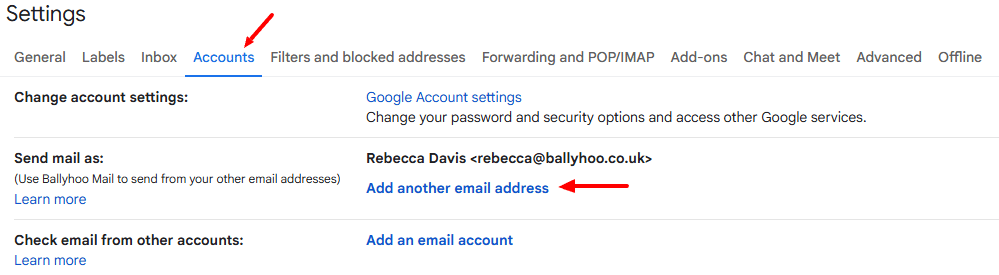
- Go to the ‘Accounts’ tab at the top, and under ‘Send mail as:’ and click ‘Add another email address’.
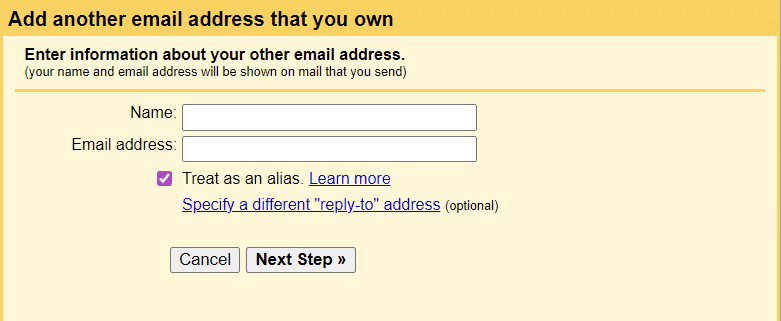
- A pop-up will appear, type in the name you want emails to appear from (optional), the alias email address you want to send from (required) and click ‘Next Step’. Then click ‘Send Verification’.
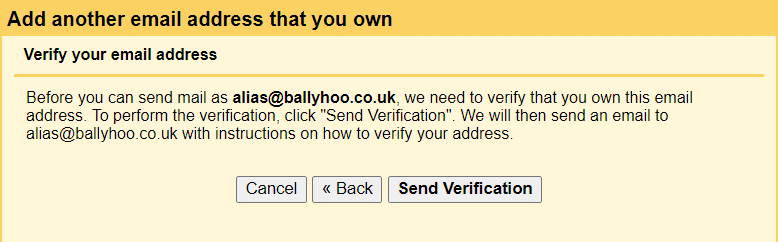
- You’ll receive an email with a link to click to verify the requests.
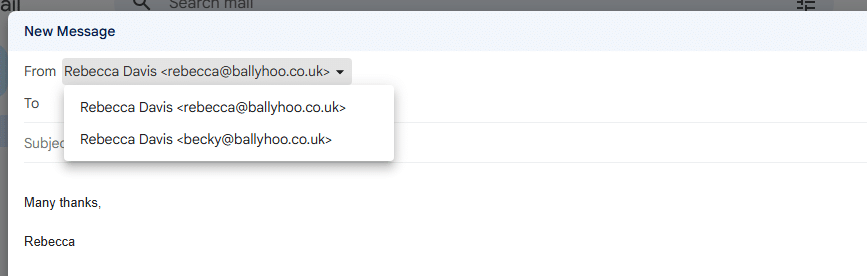
- Your new sending alias will then be ready to use. Next time you write a new email, you’ll be able to select the address you want to send from in the ‘From’ field.
Google Workspace Partners
Ballyhoo are a Google Workspace Partner – we can set up, manage and give you support with your Google products. If you’re interested in using Ballyhoo as your Google Reseller, or want more information, call us on 0121 295 5352 or email us at [email protected] to see how we can help.